Need help with anything in this article or have other questions? Contact us at support@noticiasolutions.com
Load files are crucial components for loading previously processed material.
1) What load files do
- Load files are plain-text instruction files used to import productions into eDiscovery review platforms.
- They tell the platform what each document is (metadata) and how its images should be displayed (page order and document boundaries).
- If the load files are wrong, imports fail or documents appear merged, split, missing pages, or with scrambled metadata.
2) The two load files you must master
File | Controls | Rule of thumb |
DAT | Metadata, families, links to natives/text | One row = one document |
OPT | Images and page order | One line = one page |
3) DAT files: structure and essentials
- DAT is a delimiter-based text file (do not edit in Excel).
- Header row lists metadata field names; each subsequent row is one document.
- Delimiter and text qualifier must be identified correctly at import.
Nuix Discover uses industry standard delimiter/qualifier: DC4 (¶), ASCII 20 and thorn (þ), ASCII 254, and a <CR>LF> (13,10) for line breaks:
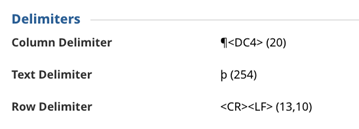
NOTE: The delimiters are simply special reserved characters that are not typically used in typewritten language. That makes them reliable as indicators for new fields, field values, and new row identification. Because they are uncommon characters, some software will not show them at all, and other software will show them as a symbol (e.g.: “þ” or “¶”), and/or the ASCII code (e.g.: 254) and/or some other viewable character. Be aware of how your load file viewing software treats each one (we recommend Notepad++).
3.1) DAT delimiter, qualifier, and line breaks
- Field delimiter: separates columns (often ¶).
- Text qualifier: wraps values so commas/quotes/line breaks don’t break the row (often þ).
- Line break: each document row must remain on a single line; embedded line breaks cause row shifting.
3.2) DAT example (annotated)
þDOCIDþ¶þBEGATTACHþ¶þENDATTACHþ¶þCUSTODIANþ¶þDATEþAUTHORþ¶þNATIVELINKþ¶þTEXTLINKþ<CR><LF>
þABC000001þ¶þABC000001þ¶þABC000003þ¶þSmith, Johnþ¶þ01/15/2023þ¶þJane Doeþ¶þNATIVES\ABC000001.msgþ¶þTEXT\ABC000001.txtþ<CR><LF>
- DOCID: unique document identifier used to match DAT ↔ OPT and other files.
- BEGATTACH/ENDATTACH or PARENTID/ATTACHIDS: define family range (parent + attachments).
- NATIVELINK/TEXTLINK: must match actual folder structure and filenames exactly.
3.3) Common DAT fields (what they mean)
Field | Meaning / Why it matters |
DOCID / BEGDOC | Unique ID; must match OPT and file paths. |
BEGATTACH | First document in family; used to group parent/attachments. |
ENDATTACH | Last document in family; must be consistent across family. |
PARENTID | The source document ID; populated in the attachment's metadata |
| ATTACHID | All the IDs of the attachments in a family; separated by a delimiter; populated in the parent's metadata |
CUSTODIAN | Source custodian; often used for filtering and analytics. |
DATE / DATESENT | Sorting/timelines; ensure consistent date format. |
AUTHOR | Privilege and authorship analysis. |
FILEEXT | Helps platform determine viewer/handling. |
NATIVELINK | Path to native file; required if producing/hosting natives. |
TEXTLINK | Path to extracted text; used for searching when no OCR. |
4) OPT files: structure and essentials
- OPT is a text index that ties document IDs to image files and page order.
- Unlike a DAT an OPT does not contain a header row.
- Each line represents a single page image (typically TIFF).
- A 'Y' flag indicates the first page of a new document.
4.1) OPT example (annotated)
ABC000001,ABC000001,IMAGES\ABC000001.tif,Y,,,3
ABC000001,ABC000001,IMAGES\ABC000002.tif,,,,
ABC000001,ABC000001,IMAGES\ABC000003.tif,,,,
- Column 1: Document ID (should match DAT DOCID).
- Column2: Contains the Box/Folder Name the material is in. It does not need to be populated
- Column 3: Image path (must exist; relative vs absolute depends on import settings).
- Column 4: Y on the first page of each document; blank on subsequent pages.
- Column 4: Folder Break (not used by eDiscovery - left blank, but must be included)
- Column 6: Box Break (not used by eDiscovery - left blank, but must be included)
- Column 7: Number of pages for the document
5) How DAT and OPT work together
DAT | OPT |
Defines document identity and metadata | Defines which images belong to which document |
Defines families (attachments) | Defines page order and document breaks (Y flags) |
Links to natives/text (optional but common) | Links to TIFF/JPG images (typically TIFF) |
**Critical rule: DOCIDs must match exactly between DAT and OPT (including leading zeros, spacing, and case).
6) QA Notes - Nuix Discover
Area | Load File – Things to Watch |
Delimiter/format strictness | Mismatched delimiters/spacing/hard returns can break imports. |
Common failure mode | OPT Y-flag issues → merged/split docs; path/encoding sensitivity.
Family issues from BEGATTACH/ENDATTACH or PARENTID/ATTACHIDS; field mapping errors. |
Best practice | QA load files thoroughly before import; validate paths early.
Save reusable import settings. |
7) Typical troubleshooting workflow
- Confirm the symptom (merged docs, missing images, shifted fields, broken families, failed import).
- Open DAT/OPT in a proper text editor (Notepad++, UltraEdit) — not Excel.
- Verify delimiter/qualifier (DAT) and Y flags + paths (OPT).
- Spot-check DOCIDs across DAT, OPT, and file folders (images/natives/text).
- Fix the load files (or request corrected files), then re-import with consistent settings.
- Document what happened and what settings were used (for repeatability).
8) Golden rules (memorize)
- Never assume delimiters—confirm them.
- One DAT row per document; one OPT line per page.
- DOCIDs must match exactly across everything.
- Exactly one Y flag per document in OPT.
- Paths must match the real folder structure exactly.
Was this article helpful?
That’s Great!
Thank you for your feedback
Sorry! We couldn't be helpful
Thank you for your feedback
Feedback sent
We appreciate your effort and will try to fix the article